

Verify Banner
Disclaimer
Verify API helps wallets detect suspicious or malicious domains, but it may not catch every threat. Use it as one more layer of protection alongside your wallet’s other security measures.Domain risk detection
The Verify security system will discriminate session proposals & session requests with distinct validations that can be eitherVALID, INVALID or UNKNOWN.
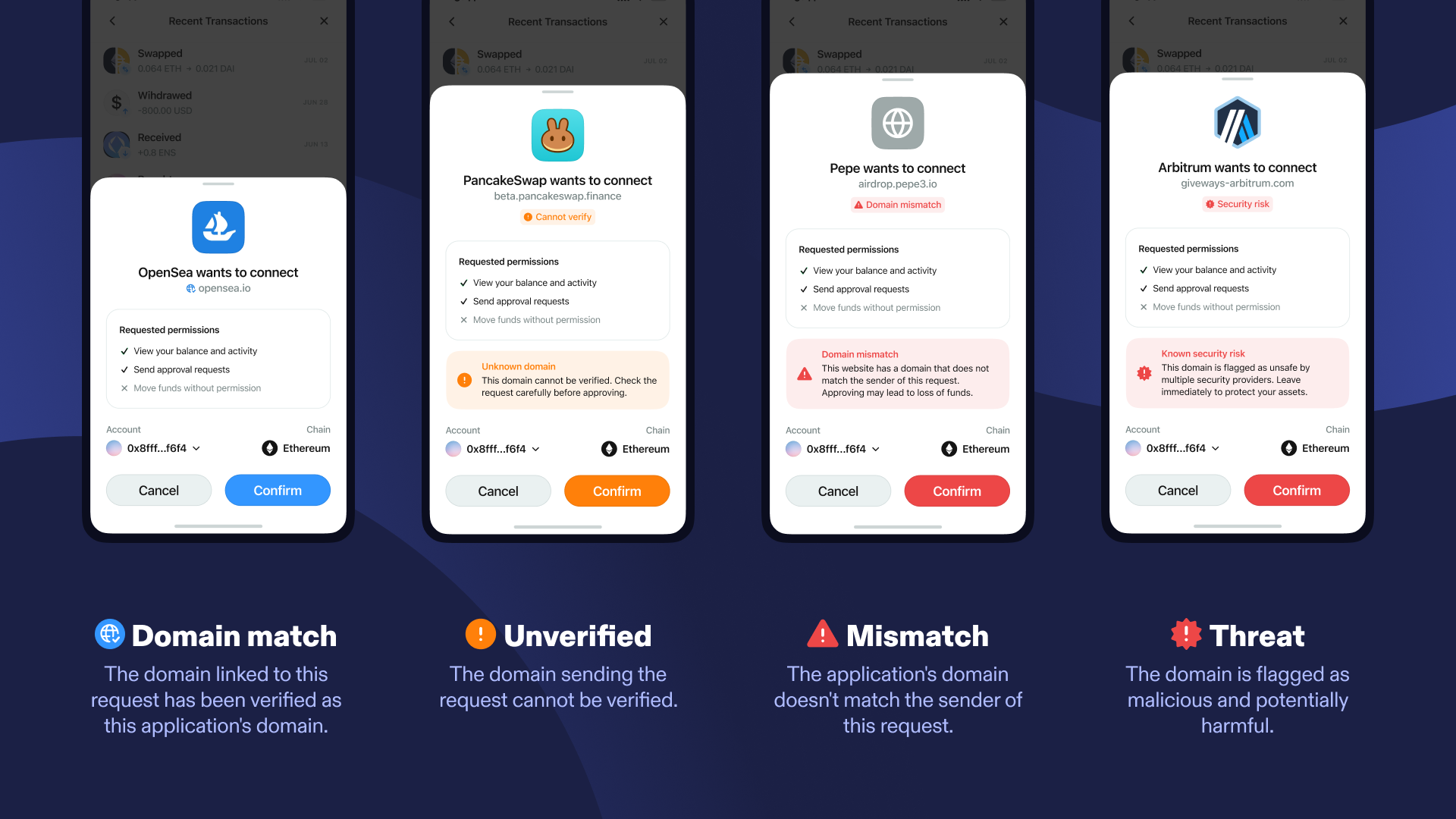
- Domain match: The domain linked to this request has been verified as this application’s domain.
- This interface appears when the domain a user is attempting to connect to has been ‘verified’ in our domain registry as the registered domain of the application the user is trying to connect to, and the domain has not returned as suspicious from either of the security tools we work with. The
verifyContextincluded in the request will have a validation ofVALID.
- This interface appears when the domain a user is attempting to connect to has been ‘verified’ in our domain registry as the registered domain of the application the user is trying to connect to, and the domain has not returned as suspicious from either of the security tools we work with. The
- Unverified: The domain sending the request cannot be verified.
- This interface appears when the domain a user is attempting to connect to has not been verified in our domain registry, but the domain has not returned as suspicious from either of the security tools we work with. The
verifyContextincluded in the request will have a validation ofUNKNOWN.
- This interface appears when the domain a user is attempting to connect to has not been verified in our domain registry, but the domain has not returned as suspicious from either of the security tools we work with. The
- Mismatch: The application’s domain doesn’t match the sender of this request.
- This interface appears when the domain a user is attempting to connect to has been flagged as a different domain to the one this application has verified in our domain registry, but the domain has not returned as suspicious from either of the security tools we work with. The
verifyContextincluded in the request will have a validation ofINVALID
- This interface appears when the domain a user is attempting to connect to has been flagged as a different domain to the one this application has verified in our domain registry, but the domain has not returned as suspicious from either of the security tools we work with. The
- Threat: This domain is flagged as malicious and potentially harmful.
- This interface appears when the domain a user is attempting to connect to has been flagged as malicious on one or more of the security tools we work with. The
verifyContextincluded in the request will contain parameterisScamwith valuetrue.
- This interface appears when the domain a user is attempting to connect to has been flagged as malicious on one or more of the security tools we work with. The
Reading verifyContext by connection type
How your wallet should read verifyContext depends on how the dApp connects:
- Web dApp over QR code or deep link (relay): This is the full Verify API, including scam checks. Show all four states:
VALIDas Domain match,UNKNOWNas Cannot verify,INVALIDas Mismatch, andisScamas Security risk (ideally blocking or requiring the user to confirm). - Native dApp over relay: Native apps can’t create a Verify attestation, so
UNKNOWNis expected here. We suggest a neutral “Cannot verify” label rather than an alarming warning. - Link Mode (native to native): The domain check above applies, with no scam check.
INVALIDmeans the dApp’s universal link domain doesn’t match itsmetadata.url. The wallet’s own Link Mode setup also needs to be complete, or the result falls back toINVALID.
Implementation
onSessionProposal and onSessionAuthRequest include a verifyContext. onSessionRequest doesn’t, so read it from the matching pending request. Map it to one of the four states once, then use that state in each handler.
THREAT: Block the request, or require the user to explicitly accept the risk. Check before anything else, so the user doesn’t also see a Mismatch warning.MISMATCH: Show a warning and proceed only if the user accepts the risk.UNVERIFIED: Show a neutral “Cannot verify” label. Don’t block the request, since native dApps over relay always land here.DOMAIN_MATCH: Show a verified badge and proceed as normal.